Trade Ideas has one of the most recognizable names in active trading software, but recognition isn’t the same as value. This review gives you a straight answer on whether it still earns that reputation in 2026. Holly AI gets a lot of attention, and the platform has a loyal following. It also runs over $2,000 a year, keeps its full feature set on a Windows desktop app, and takes real time to learn. If you’re deciding whether to subscribe, renew, or move on, here’s what the platform actually does well, where it falls short, and what else is worth considering at this price point.
Pricing and features checked against each vendor’s own pricing page, help documentation and user guide in August 2026, with prices re-checked on 24 September 2026. These change often, so confirm before you buy.
What Trade Ideas Is
Trade Ideas is a real-time stock scanning platform built primarily for day traders. The headline feature is Holly AI, an automated system that runs overnight simulations to generate trade ideas for the following session. Beyond Holly, the platform offers over 500 real-time filter data points, a customizable alert system, and a built-in paper trading simulator called OddsMaker.
The core workflow is straightforward: set up scans, receive alerts, act on signals. That real-time scanner runs on its own and is the bulk of what you’re paying for. Holly sits alongside it rather than replacing it.
It’s a serious tool. Serious comes with tradeoffs.
Holly AI: What It Actually Does
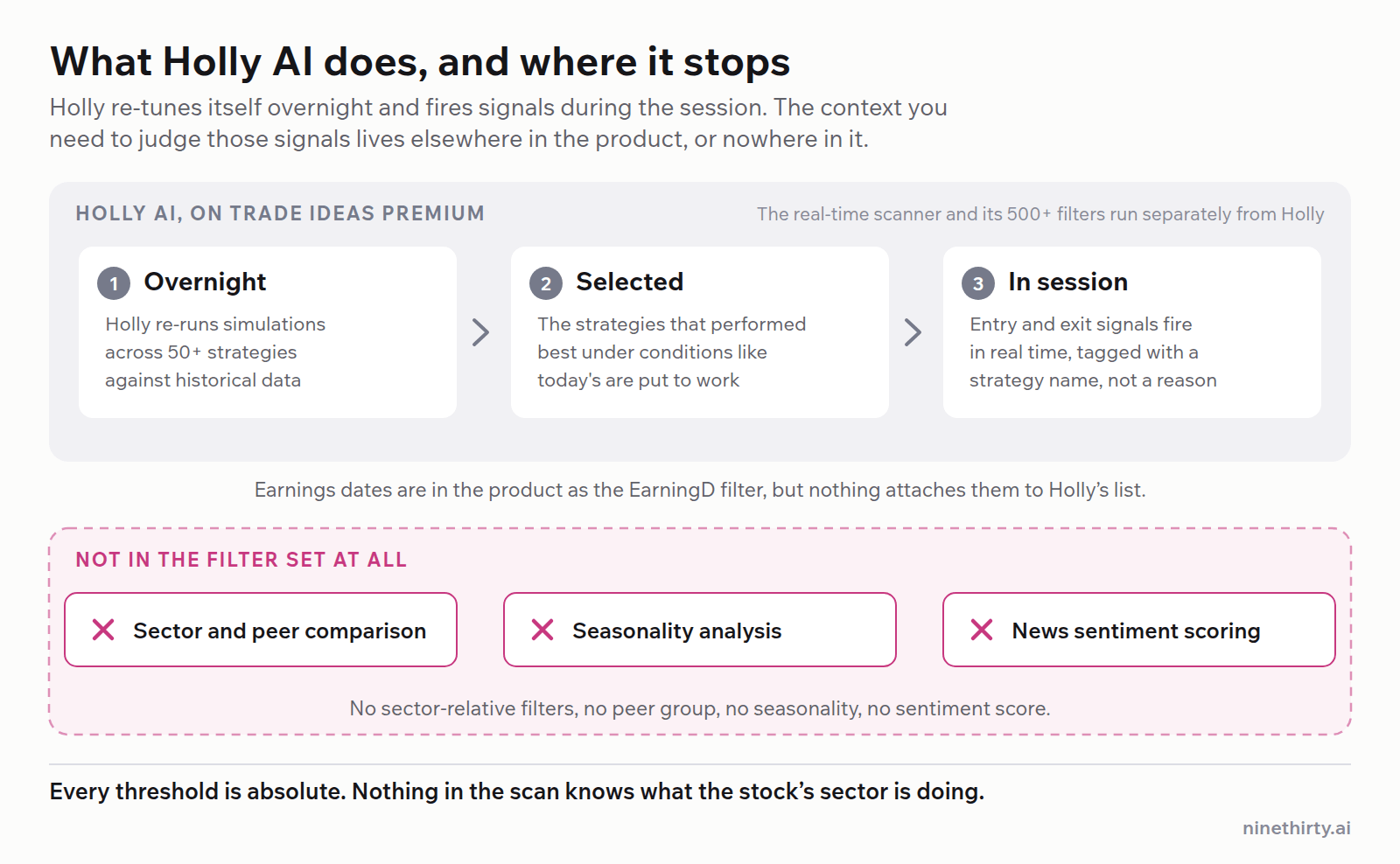
Holly AI is not a chatbot, and it is not the whole product either. Every night it re-runs simulations across more than fifty strategies against historical data, keeps the ones that performed best under conditions resembling the current market, and then puts those to work during the session. Entry and exit signals fire in real time as they trigger, not as a fixed list at the open.
That distinction matters more than it might seem. Signals arrive tagged with the name of the strategy that produced them, something like Alpha Predator, which tells you which bucket it came from but not why this stock and not why now. Traders expecting a conversational AI that helps them think through a setup will be disappointed.
What Holly Gets Right
It removes the need to manually build and test dozens of scan configurations. Starting each session with pre-filtered ideas rather than a blank slate has real practical value. For traders who want a hands-off, signal-driven workflow, it fits that use case reasonably well.
Where Holly Falls Short
Holly hands you a ranked signal list and stops. The context you need to judge those signals is either somewhere else in the platform or not there at all.
To be precise about it, Trade Ideas does have an earnings date filter, EarningD, which screens on days to or since a report, and it puts earnings icons on charts. What it doesn’t do is attach any of that to Holly’s output. The filter is something you have to know exists and remember to apply. Holly’s ranked list arrives without it.
Beyond earnings, the gaps are real. There’s no news sentiment scoring, so a stock moving on a bad headline looks identical to one moving on nothing. There’s no economic events calendar. And there’s no way to compare a stock against its own sector or its peers, which means a signal that’s just sector beta looks the same as one that isn’t.
Price action and context aren’t separate disciplines for most active traders. They’re the same decision.
Trade Ideas Pricing in 2026
Trade Ideas lists two retail plans on its own pricing page, and the numbers have moved since most of the reviews you’ll find online were written.
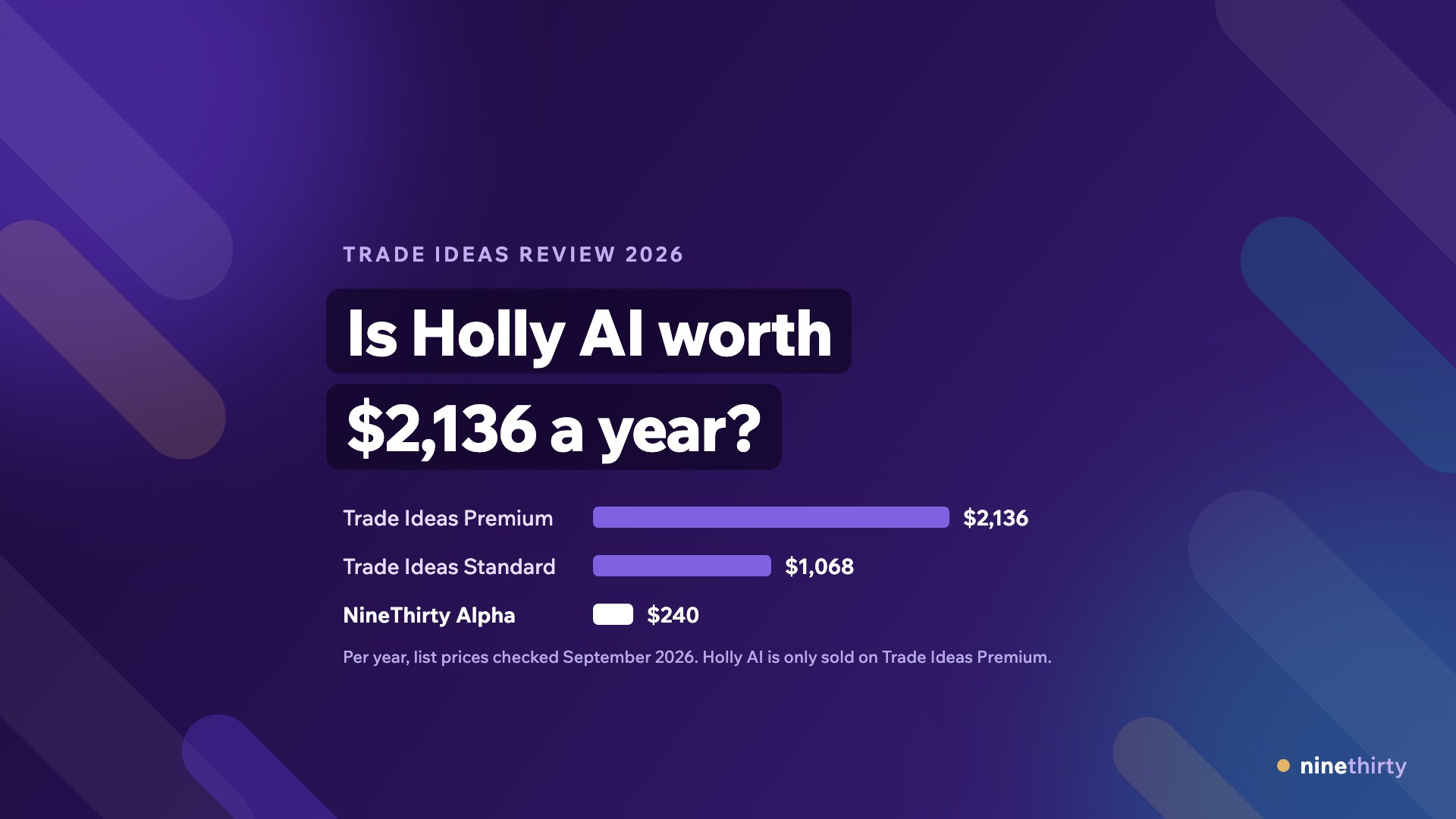
Standard: $1,068 per year, which works out to $89 per month. Billed month to month it’s $127.
Premium: $2,136 per year, which works out to $178 per month. Billed month to month it’s $254, so the annual commitment saves you $912.
Holly AI is only available on Premium. If Holly is the reason you’re considering Trade Ideas, your real number is $2,136 a year at best and $3,048 if you pay monthly.
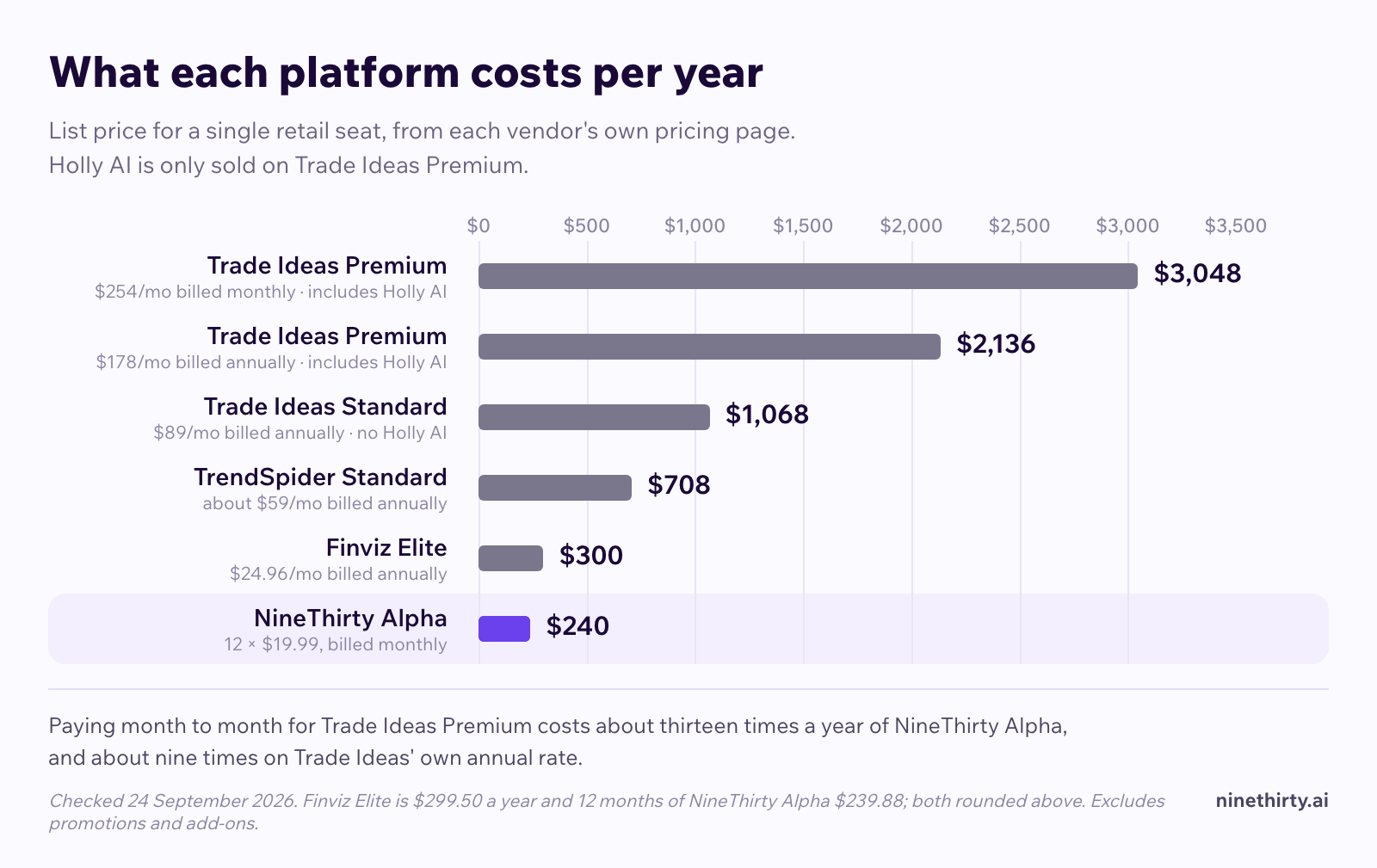
That’s a significant spend for a retail trader, especially once you factor in the other tools you’ll still need alongside it: a charting platform, an earnings calendar, a news feed, and likely a separate backtesting environment. The platform price is just the starting point.
The Windows Problem
The full Trade Ideas product is a standalone Windows desktop application. Their own user guide describes it as built “for the power user who demands more than a web-based front end can offer.”
There is a web application, and it is aimed squarely at Mac users and mobile traders. The guide calls it “a slimmer, pared-down Web Application.” So the honest version is not that Mac users are locked out. It’s that Mac users get the reduced edition, and the guide is upfront about which one is the real product.
If you work across devices or prefer browser-based tools, that’s a constraint worth pricing in before you commit to an annual plan.
What Trade Ideas Does Well
To be fair, there are genuine strengths worth naming.
Real-time scanning depth. Over 500 filter data points with real-time updates is a serious capability. If you need granular, low-latency scanning for momentum setups, Trade Ideas delivers.
OddsMaker paper trading. The built-in simulator lets you test how alerts would have performed historically. It’s not a full-featured backtester, but it gives you a baseline read on signal quality before you commit capital.
Community and education. Trade Ideas has a large user base and reasonably active community resources. For traders newer to systematic scanning, the learning materials help.
Alert customization. The alert system is flexible and can be configured to match specific intraday setups with real precision.
What Trade Ideas Lacks
The gaps are worth naming just as clearly.
No sector or peer comparison. Trade Ideas’ filter set has no sector-relative or peer-group filters. You can’t ask for a stock cheaper than its own sector, or screen out a name that’s only moving because its whole industry is. Every threshold is absolute.
No seasonality analysis. There’s no seasonality or calendar-pattern filter. Trade Ideas publishes an educational article on market seasonality, but it isn’t a tool in the product.
Fundamentals are levels, not trends. You get market cap, shares outstanding, cash, debt, EPS, P/E and dividend data. You don’t get return on equity, revenue growth, or any way to screen on the direction of the numbers across several reports.
No news sentiment layer. Stock-relevant news is available in the Single Stock Window, but it isn’t scored or filterable by sentiment. If a stock is moving on a negative headline, nothing surfaces that in context.
No economic events calendar. Fed decisions, CPI prints and the rest are tracked somewhere else.
No conversational AI. Holly labels a signal with the strategy that fired it, which is not the same as explaining it, and there is nothing to ask a follow-up question of. If you want to understand why this stock and not the other one, you’re on your own.
No multi-timeframe screener in the traditional sense. Trade Ideas scans are primarily intraday and end-of-day. Combining monthly trend context with hourly momentum signals isn’t a native workflow.
The full product is Windows-only. The web application exists for Mac and mobile, but their own documentation positions it as the pared-down edition.
Who Trade Ideas Is Actually For
Trade Ideas fits a specific profile: a Windows-based day trader who wants pre-built AI signals for the next session, is comfortable with a steep learning curve, and doesn’t need their scanner to talk to their calendar or news feed.
If that’s you, Premium at $2,136 a year may be defensible depending on your trading volume and edge.
If you’re a swing trader, a Mac user who wants the full feature set, someone who wants to backtest your own screening criteria, or someone who needs sector context in the same workspace as your scanner, Trade Ideas is likely not the right fit, regardless of how compelling Holly AI sounds on paper.
A Closer Look at the Alternatives
TrendSpider
TrendSpider automates multi-timeframe trendline detection and offers no-code strategy backtesting. Standard lists at $89 per month on monthly billing, or $708 a year, about $59 per month, and Premium starts at $149 per month. It is the most capable of the three alternatives here and deserves credit for it: earnings data is available both by date and by value inside the Scanner and Smart Checklist, so you can scan for something like a report due in five days, and there is a seasonality widget. It’s technically impressive but complex to navigate. Sidekick, the AI assistant, includes 25 messages a month on every plan. More needs a separate Sidekick subscription, from $49 a month for 100 messages. Scanning on Standard is limited to a two-hour minimum timeframe, so intraday work means stepping up a tier. It’s a better fit for traders who want chart automation than for those who want a single research workspace.
Finviz Elite
Finviz Elite is $39.50 per month billed monthly, or $299.50 a year, which is about $25 a month. It’s a strong screener with a well-known heatmap, and Elite adds real-time data, intraday charts and 20-plus advanced filters on top of the standard screener. Finviz ended its backtester on 26 March 2026, so Elite no longer tests anything over history. What you also don’t get is an AI assistant, a news sentiment layer, or sector-relative screening. It’s a very good screener at a fair price rather than a complete workflow.
NineThirty
NineThirty is a browser-based platform that consolidates what most active traders currently spread across four or five separate tools. The screener runs from monthly candles down to minute level, and conditions on different timeframes can sit in the same screen, so weekly trend context and a daily trigger resolve together rather than in two tabs.
Backtesting runs the screen itself over history, so you can test whether a combination of monthly support, positive insider activity, and bullish news sentiment would have surfaced strong setups historically, then remove one condition and run it again.
Trading involves risk of loss. Backtested performance is hypothetical, does not reflect actual trading, and does not indicate future results.
Stocks can be compared against their own sector and their nearest peers, both as pages and as a screening condition, so “cheaper than its sector” is something you can filter on rather than check afterwards. There’s a sector heatmap, a sector ratios table and a seasonality tool. The events calendar covers earnings, dividends, and economic releases with impact ratings. The news feed includes sentiment and category filtering, and news is screenable as a condition rather than only readable, which means you can require that nothing high-impact has happened. Dr. Market, the platform’s AI assistant, answers market questions and works through analysis in real time. There are pre-built US screens, including News Gap, Insider Gap Up, and Gap Up Continuation, so you have a starting point without building from scratch.
The Alpha plan is $19.99 per month, an introductory rate against a $99.99 list price, billed monthly. That puts it well below Trade Ideas Standard, let alone Premium, while covering capabilities Trade Ideas doesn’t offer at any price point. There’s also a free tier.
Trade Ideas vs. NineThirty: Side-by-Side
| Feature | Trade Ideas Premium | NineThirty Alpha |
|---|
| Price | $2,136/year ($178/mo), $254/mo monthly | $19.99/month, billed monthly |
| Platform | Windows desktop for the full product, pared-down web app for Mac and mobile | Browser-based, full product |
| AI assistant | Holly AI (signal-based) | Dr. Market (conversational) |
| Multi-timeframe screener | Limited | Monthly to minute level in one screen |
| Screener backtesting | OddsMaker (alert simulation) | Backtests the screen itself |
| Earnings data | EarningD filter, not attached to Holly output | Events calendar with impact ratings and return analysis around past announcements |
| Economic events calendar | Not included | Included |
| News sentiment | News available, not scored or filterable | Scored, filterable, screenable as a condition |
| Sector and peer comparison | Not included | Heatmap, ratios table, peer view, and a screening condition |
| Seasonality analysis | Not included | Included |
| Fundamentals | Levels only (market cap, EPS, P/E, debt) | 20+ fundamentals across the income statement, cash flow and balance sheet |
| Insider activity filters | Not included | Included |
| Free tier | No | Yes |
The Honest Verdict on Trade Ideas
Trade Ideas isn’t a bad product. Holly AI is a genuinely differentiated feature for traders who want pre-built overnight signals and are comfortable operating within a Windows-only, signal-focused workflow. The real-time scanning depth is real.
But the price is high, the full product only runs on Windows, and the gaps around sector context, seasonality, news sentiment and conversational AI aren’t minor inconveniences. They’re missing layers that most active traders need to make confident decisions.
If you’re already paying for Trade Ideas and getting clear value from Holly AI signals, that’s a reasonable use case. If you’re evaluating it fresh in 2026, or if you’re currently juggling four separate tools and looking for something more consolidated, the math doesn’t obviously favor Trade Ideas over alternatives that cost less and cover more ground.
The Bottom Line
Trade Ideas earns its reputation in a narrow lane: Windows-based day traders who want AI-selected signals and deep real-time scanning. Outside that lane, the price, the platform restriction, and the missing context layers make it a harder sell in 2026.
If your workflow involves juggling multiple tools and you want to consolidate without sacrificing depth, the NineThirty screener is worth a look. The free tier lets you test the workspace before committing to anything.
DISCLAIMER: This article is for educational and informational purposes only. It does not constitute investment advice or a research report.